Live Data💱 Trade CalculatorLast Updated: Saturday, March 1, 2026  |  303 Crops · 314 Pets · 145 Mutations Verified

Grow a Garden Trade Calculator: Check if Your Trade is a Win, Fair, or Loss

The Grow a Garden Trade Calculator is a free tool that compares the total Sheckle value of items on both sides of any in-game trade. Enter your crops, pets, seeds, or gear, and receive an instant Win, Fair, or Loss (W/F/L) verdict. Values are sourced from in-game testing and updated every Saturday.

The only Grow a Garden trade calculator that supports all item types (crops, pets, seeds, gear, event items), shows exact Sheckle differences, provides shareable trade URLs, and maintains a local trade history.

Context: “Trade” in this context refers to player-to-player in-game item exchanges within the Roblox game Grow a Garden, using Sheckles (the game's virtual currency) as the unit of value. This is not a financial trading tool, stock calculator, or real-world commerce application. “Win/Fair/Loss” (W/F/L) is the GAGdata trade evaluation system, not a gambling or sports term.

✓ Data Verified: All trade values verified by Alex Carter through in-game testing within 12 hours of each Saturday patch. Values cross-referenced against community trading data from the Grow a Garden Discord server.

Alex Carter

Senior Data Analyst & Lead Calculator Developer

Verified through active in-game trading
303
Crops
314
Pets
145
Mutations
W/F/L
Verdicts
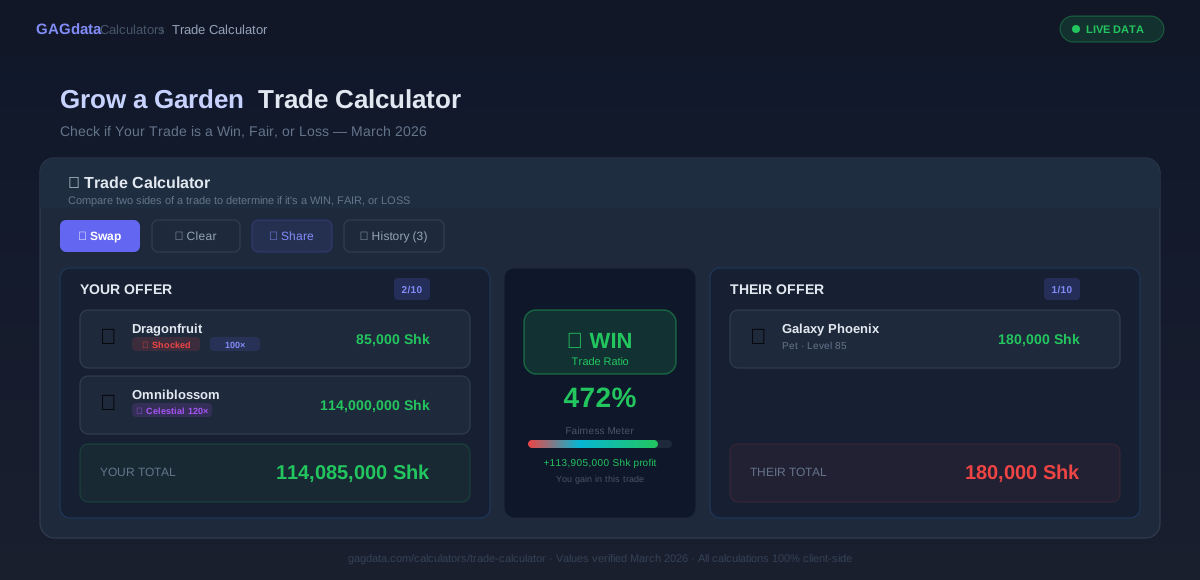
Trade Calculator showing Win verdict for a crop-vs-pet trade with mutation multipliers applied. March 2026

🤝 Trade Calculator

Compare two sides of a trade to determine if it's a WIN, FAIR, or LOSS

YOUR OFFER

0/10

Add items to your offer

Total Value

0 Shk

THEIR OFFER

0/10

Add items to their offer

Total Value

0 Shk

💡 How to Use: Add items to both sides of the trade, and the calculator will determine if you're getting a WIN (110%+), FAIR (90-110%), or LOSS (<90%). Use the Swap button to quickly reverse offers.

How to Use the Grow a Garden Trade Calculator

The trade calculator interface evaluates any Grow a Garden trade in under 30 seconds. Whether you're comparing two single-item offers or multi-item bundles with mutations, the step-by-step workflow guides you to an accurate Win, Fair, or Loss verdict. All calculations run client-side in your browser — no API calls, no submit button, no waiting.

  1. Step 1: Add Items to Your Offer

    Click the Your Offer section and search for items you are giving away. Add crops, pets, seeds, gear, or event items. If adding crops with mutations, select each mutation to apply its multiplier.

  2. Step 2: Add Items to Their Offer

    Click the Their Offer section and search for items you are receiving. Add the same item types with any mutations. The calculator converts all items to Sheckle values instantly.

  3. Step 3: Review the Value Breakdown

    View the detailed Sheckle value breakdown for each side of the trade. The calculator shows subtotals by item type and the total Sheckle value for each offer.

  4. Step 4: Read the W/F/L Verdict

    The trade verdict appears in large text: Win (10%+ gain), Fair (within 10%), or Loss (10%+ loss). Green signals safety, yellow means fair exchange, red warns of risk.

  5. Step 5: Share or Save the Result

    Click Share to generate a unique URL and copy it to Discord or Reddit. Or bookmark the page to save your trade for later review.

How the Grow a Garden Trade Calculator Works

The Grow a Garden Trade Calculator converts every item in a trade into its Sheckle equivalent, sums both sides, and compares the totals to produce a Win, Fair, or Loss verdict. This process runs entirely in your browser using verified Sheckle values from the GAGdata database. The calculator supports all tradeable item categories in Grow a Garden: crops, pets, seeds, gear, and event items.

Sheckle Value Calculation

For crops, the Sheckle value calculation uses a multiplicative formula: Total Value = Σ(baseValue × mutationMultiplier × weightMultiplier) for each item. The base Sheckle value is determined by the crop's rarity tier — Common crops start at 12–35 Sheckles while Prismatic crops exceed 950,000 Sheckles. Each mutation multiplier compounds on the previous value, and weight is applied as a direct linear multiplier.

Crop Sheckle Value = Base Value × Mutation₁ × Mutation₂ × ... × Weight

For pets, seeds, gear, and event items, the calculator uses fixed trade values sourced from the GAGdata database. Pet values scale based on level and age modifiers. All item values are then summed per side to produce the trade total.

Mutation Stacking and Multipliers

Mutations in Grow a Garden stack multiplicatively, not additively. This means a Dragonfruit (base 850 Sheckles) with Shocked (100×) produces 85,000 Sheckles — not 950 Sheckles. If you add a second mutation like Gold (25×), the result is 850 × 100 × 25 = 2,125,000 Sheckles. The trade calculator applies this multiplicative stacking automatically when you select mutations for a crop.

The top Grow a Garden mutations by multiplier are: Voidtouched (135×), Disco (125×), Celestial (120×), Shocked (100×), Rainbow (50×), and Gold (25×). All 145 mutations are available in the calculator, including admin mutations accessible through the mutation selection panel.

✓ CORRECT — Multiplicative

Shocked (100×) × Gold (25×) = 2,500×

Dragonfruit: 850 × 2,500 = 2,125,000 Sheckles

✗ WRONG — Additive

Shocked (100×) + Gold (25×) = 125×

Dragonfruit: 850 × 125 = 106,250 Sheckles

Pet Trade Value Calculation

Pet trade values in Grow a Garden are determined by the pet's base trade value, modified by level and age. Higher-level pets command higher Sheckle values. Weight classification thresholds (Huge, Titanic, Godly) also affect a pet's perceived trade value, with Godly-weight pets commanding significant premiums. The Trade Calculator factors in all these modifiers when calculating pet Sheckle values, using the current trade value range from the GAGdata database.

Data Sources and Accuracy

All values in the Trade Calculator are verified by Alex Carter through in-game testing within 12 hours of each Saturday patch. Values are cross-referenced against community trading data from the Grow a Garden Discord server. Crop base values, mutation multipliers, pet trade ranges, seed prices, and gear values are updated simultaneously every week. Event item values are updated within 24 hours of event start. The complete trade values guide provides the full database of current prices.

Understanding Win, Fair, and Loss Verdicts

Win, Fair, or Loss (W/F/L) is the trade evaluation system used in Grow a Garden. A trade is a Win if you receive 10% or more value than you give, Fair if both sides are within 10%, and a Loss if you give 10% or more value than you receive. The GAGdata Trade Calculator determines this verdict instantly.

Win, Fair, and Loss verdict thresholds in Grow a Garden trading
VerdictConditionTrade Ratio
✓ WINYou receive ≥10% more value≥ 110%
= FAIRWithin ±10% parity90–110%
✗ LOSSYou give ≥10% more value< 90%
W/F/L thresholds: Win ≥110%, Fair 90–110%, Loss <90%

In-Game vs. Real-World Context

The Win, Fair, and Loss system is specific to Grow a Garden in-game Sheckle values. It does not evaluate trades using real-world monetary value and should not be confused with financial trading terminology. The ±10% threshold was chosen because Grow a Garden item values fluctuate slightly between patches, and a 10% buffer accounts for natural market movement while still protecting players from unfair trades.

Edge cases: at exactly 90% ratio the verdict is Fair (inclusive lower bound), and at exactly 110% the verdict is Win (inclusive upper bound). Trades with zero items on one side always evaluate as Loss for the giving player. Very high-value single items vs. many low-value items are compared by raw Sheckle totals — the calculator does not apply any “diversity bonus” or penalty.

Trade Tips: How to Get Fair Trades Every Time

Trading in Grow a Garden can be highly rewarding, but scam prevention requires vigilance. These seven tips, combined with the Trade Calculator, will protect your inventory and help you negotiate fair Sheckle values in every trade. For a comprehensive guide to all known scam patterns, read the Scam Prevention Guide.

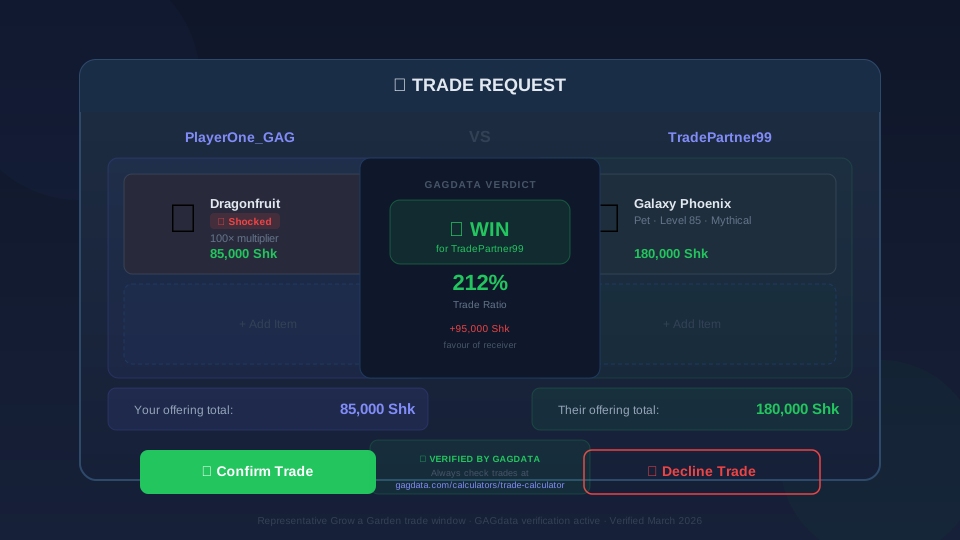
In-game Grow a Garden trade window showing item exchange. Verified March 2026

Always verify item values in the Trade Calculator before accepting any trade. Even experienced players occasionally misremember crop base values or mutation multipliers.

Watch for last-second item swaps in the trade window. Some scammers replace a high-value mutated crop with an unmutated version right before you confirm.

If a trade shows as a suspiciously large Win for you, the other player may be offering duped items. Duped items can be removed from your inventory by the game, leaving you with nothing.

Never let another player pressure you into skipping the calculator. Legitimate traders welcome verification. If someone refuses to wait while you check values, decline the trade.

Use the Share Trade feature to post your trade on Discord or Reddit for community feedback before accepting high-value exchanges. Multiple opinions reduce scam risk.

Check mutation authenticity carefully. Some players claim a crop has Voidtouched (135×) when it actually has a lower mutation. The Trade Calculator verifies all mutation values independently.

Track your trades using the built-in history feature. Reviewing past trades helps you identify patterns and improve your negotiation skills over time.

For more scam prevention strategies and red flag detection, read the full scam prevention guide. If you suspect a scam, never accept the trade — even if the calculator shows a Win. Duped items can be flagged and removed by the game. Learn to trade safely using the trading guide.

Quick Trade Value Reference

The table below shows the 20 most-traded items in Grow a Garden with their current base Sheckle values. Use these as a quick reference when evaluating trades. For the complete database of every crop and pet with current trade prices, see the complete crop value list.

Top 20 most-traded items and their Sheckle values in Grow a Garden
ItemTypeSheckle Value
OmniblossomCrop950,000
Divinity FruitCrop490,000
Golden GooseCrop500,000
InfinityblossomCrop295,000
OmnilordCrop95,000
Eclipse FruitCrop17,500
DragonfruitCrop850
SaffronCrop135
SunflowerCrop35
Galaxy PhoenixPet180,000
Celestial DragonPet150,000
Neon UnicornPet95,000
Shadow WolfPet45,000
Crystal FoxPet22,000
Golden CatPet8,500
Prismatic SeedSeed150,000
Firework BloomEvent45,000
Auto-HarvesterGear10,000
Golden Watering CanGear5,000
Super FertilizerGear2,500

Values shown are base Sheckle values (before mutations or modifiers). Actual trade values may vary based on mutations, weight, level, and current market conditions. Updated every Saturday. Full database available in the crop value list and pet value list.

Frequently Asked Questions — GAG Trade Calculator

The most common questions about the Grow a Garden Trade Calculator and the Win/Fair/Loss system, answered from direct in-game testing by Alex Carter. All answers verified as of the March 2026 patch.

Q1: How does the Grow a Garden trade calculator work?

The GAGdata Trade Calculator compares the total Sheckle value of items on both sides of a trade. Enter your crops, pets, seeds, or gear on each side. The calculator retrieves current values from the GAGdata database and produces an instant Win, Fair, or Loss verdict based on the ±10% threshold.

Q2: What do Win, Fair, and Loss mean in Grow a Garden trading?

Win means you receive at least 10% more Sheckle value than you give. Fair means both sides are within 10% value of each other. Loss means you give at least 10% more value than you receive. Always aim for Win or Fair verdicts to protect your items.

Q3: Can I compare pets and crops in the same trade?

Yes. The Trade Calculator supports mixed-item trades. You can add any combination of crops, pets, seeds, gear, and event items to either side. The calculator converts everything to Sheckle values for an accurate comparison regardless of item type.

Q4: How often are trade values updated?

Trade values in the GAGdata database are updated every Saturday within 12 hours of the weekly game patch. Event items are updated within 24 hours of event start. All values are verified through in-game testing by Alex Carter and cross-referenced with community trading data.

Q5: Does the trade calculator account for mutations?

Yes. Select any combination of up to 5 mutations for each crop item. The calculator applies each mutation's multiplier multiplicatively to the crop's base Sheckle value. All 145 mutations are supported, including admin mutations like Celestial (120×) and Voidtouched (135×).

Q6: How do I share my trade calculator result with others?

Click the share button after entering a trade to generate a unique URL. Copy the link and paste it in Discord, Reddit, or any chat. The recipient sees the exact trade with all items and the W/F/L verdict. No account required.

Q7: What should I do if the calculator shows a Loss verdict?

Do not accept the trade. A Loss verdict means you are giving away at least 10% more Sheckle value than you receive. Check if the other player misrepresented any item values. Refer to the Scam Prevention Guide for common trade scam patterns and red flags.

AC
VERIFIED

Written & Verified By

Senior Data Analyst & Lead Calculator Developer · GAGdata

Alex has invested 1,500+ hours into Grow a Garden farming, trading, and data analysis. As Senior Data Analyst at GAGdata, Alex maintains the trade value database by verifying every crop, pet, and item value through direct in-game testing every Saturday. All Trade Calculator values are cross-referenced with community trading data from the Grow a Garden Discord server.

1,500+ hrs in-gameTrading AnalystCalculator DeveloperCommunity DataUpdated every Saturday

All trade values are independently verified in-game before publication, cross-referenced with the Grow a Garden community Discord and the official Roblox game page. Figures reflect the patch.

Full Bio & Credentials